Quick answer: To get started in cloud computing, pick one platform (AWS, Azure or Google Cloud), open a free-tier account, learn the core services — compute, storage, networking, identity and databases — and build two or three small projects you can show. Add Linux, basic Python and Git along the way, then validate your skills with an entry-level certification such as AWS Cloud Practitioner or Azure Fundamentals. Most motivated beginners reach job-ready in six to nine months of consistent study.
Cloud computing is the delivery of computing resources — servers, storage, databases, networking, software — over the internet, on demand, paid for as you use them. The “cloud” is simply someone else’s data centre, rented by the hour. In this guide you will learn what cloud computing involves, which skills and tools matter, the main career paths and what they pay in India, a step-by-step roadmap, a first hands-on exercise, and the mistakes that slow beginners down.
What cloud computing actually is
Before the cloud, a company that wanted a new application had to buy servers, wait weeks for delivery, rack them, power them and maintain them. Today you can launch a server in Mumbai or Singapore in under a minute and delete it when you are done. That shift is why organisations have moved so quickly: lower upfront cost, instant scaling, and the ability to use the same security and reliability tooling that global companies use.
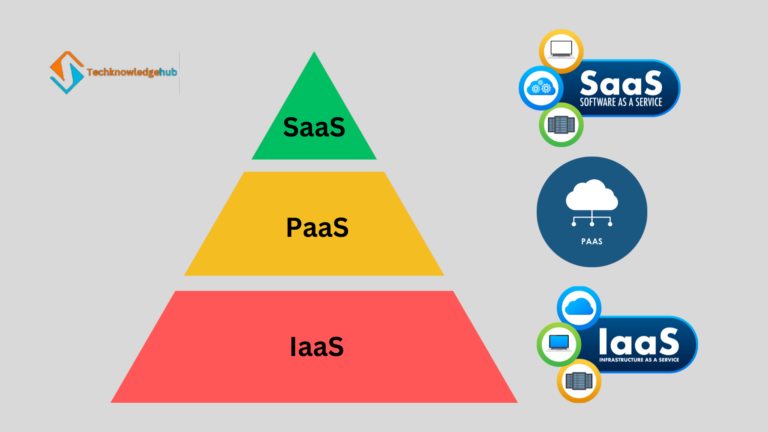
Cloud services are usually grouped into three models:
- IaaS (Infrastructure as a Service) – raw building blocks: virtual machines, disks, networks. Example: Amazon EC2, Azure Virtual Machines.
- PaaS (Platform as a Service) – a managed platform where you deploy code and the provider handles servers. Example: AWS Elastic Beanstalk, Azure App Service, Google App Engine.
- SaaS (Software as a Service) – finished applications you log into. Example: Gmail, Microsoft 365, Salesforce.
We break these down in detail, with examples of when to use each, in Cloud Service Models: IaaS, PaaS and SaaS.
Skills and tools you need
Cloud roles sit at the intersection of several disciplines. You do not need to master all of these before applying, but you should be comfortable with each:
| Area | What to learn | Why it matters |
|---|---|---|
| Cloud platform | One of AWS, Azure or Google Cloud: compute, storage, VPC networking, IAM, managed databases | The core of every cloud job; pick one and go deep |
| Linux | Shell navigation, permissions, processes, SSH, package management | Most cloud servers run Linux |
| Networking | IP addressing, subnets, DNS, HTTP/HTTPS, firewalls, load balancing | Every outage interview question is a networking question in disguise |
| Programming | Python (scripting, boto3 / Azure SDK); Java for enterprise roles | Automation and glue code |
| Infrastructure as Code | Terraform, plus Ansible for configuration | Nobody clicks through consoles at scale |
| Containers | Docker, then Kubernetes basics | The default way applications are packaged and run |
| Security | Identity and access, encryption at rest and in transit, least privilege | Security is part of every role, not a separate team’s problem |
| Version control | Git and GitHub | Your portfolio lives here |
Virtualisation technologies such as VMware and Hyper-V are still useful background, especially in hybrid-cloud enterprises, but for a beginner they come after the items above.
Cloud career paths and salaries in India
Cloud skills unlock several distinct roles. The names overlap between companies, but the focus of each is fairly consistent:
- Cloud Engineer – builds and operates cloud environments; the most common entry point.
- Cloud DevOps Engineer – automates deployment pipelines and infrastructure with CI/CD, Terraform and Kubernetes.
- Cloud Solutions Architect – designs systems end to end, balancing cost, reliability and security; usually a senior role.
- Cloud Network Engineer – designs connectivity, VPNs, hybrid links and traffic routing.
- Cloud Security Engineer – identity, compliance, threat detection and incident response in the cloud.
- Cloud Data Engineer – builds data pipelines and warehouses on services like BigQuery, Redshift and Databricks.
Indicative salary ranges in India as of 2026, drawn from public job-board data: fresh cloud engineers typically start at INR 4–8 lakh per year; mid-level Cloud DevOps Engineers earn around INR 15–25 lakh; experienced Cloud Solutions Architects command INR 20–35 lakh and more at product companies. Location, certifications and the size of the employer move these numbers considerably. For a full breakdown by level, see our Cloud Computing Career Roadmap.
A step-by-step roadmap for beginners
- Build the foundations (weeks 1–4). Learn Linux command-line basics and networking fundamentals — how DNS resolves a name, what a subnet is, what a port is. Free resources are plentiful; the goal is comfort, not mastery.
- Pick one cloud and open a free account (week 5). AWS has the largest job market in India; Azure dominates in enterprises that already use Microsoft; Google Cloud is strong in data and startups. Any of the three is a fine choice. Set a billing alert on day one.
- Learn the core services (weeks 6–12). Compute (EC2 / Virtual Machines), object storage (S3 / Blob), networking (VPC / VNet), identity (IAM / Entra ID), and one managed database (RDS / Azure SQL). Build something with each.
- Add Python and Git (ongoing). Write scripts that list, tag or stop resources using the provider SDK. Commit everything to GitHub.
- Learn Terraform and Docker (weeks 13–20). Rebuild one of your earlier projects as Terraform code. Containerise a small web app and run it on a cloud VM.
- Build portfolio projects (weeks 16–28). Examples: a static website on S3 with CloudFront and a custom domain; a three-tier app with a load balancer, auto-scaling and a database; an automated backup pipeline with serverless functions. Document each in a README.
- Get certified (around month 6–9). AWS Certified Cloud Practitioner or Microsoft AZ-900 proves fundamentals; follow with AWS Solutions Architect Associate or AZ-104 for a serious boost in interviews.
- Network and apply. Join cloud community meetups, post what you build on LinkedIn, and apply for cloud support, junior cloud engineer and NOC roles that lead into the field.
Your first hands-on exercise
Here is a small but real task you can complete in an afternoon on the AWS free tier: create a storage bucket, upload a file and list it, first with the CLI and then with Python. This covers identity, a core service and automation in one sitting.
Install and configure the AWS CLI with an IAM user that has S3 permissions (never your root account), then run:
aws s3 mb s3://tkh-first-bucket-2026 --region ap-south-1
echo "Hello from the cloud" > hello.txt
aws s3 cp hello.txt s3://tkh-first-bucket-2026/
aws s3 ls s3://tkh-first-bucket-2026/
Now do the same listing from Python with the boto3 SDK (pip install boto3):
import boto3

s3 = boto3.client("s3", region_name="ap-south-1")

response = s3.list_objects_v2(Bucket="tkh-first-bucket-2026")
for obj in response.get("Contents", []):
    print(f'{obj["Key"]}  ({obj["Size"]} bytes)')
Finally, clean up so you are not billed: aws s3 rb s3://tkh-first-bucket-2026 --force. Then push both files to a GitHub repository with a README explaining what you did. That is your first portfolio entry.
Mistakes that slow beginners down
- Trying to learn all three clouds at once. The concepts transfer. Go deep on one, and a second becomes easy later.
- Collecting certifications without building anything. Interviewers ask about projects. A certificate opens the door; a GitHub repository gets you through it.
- Skipping Linux and networking. Most troubleshooting in the cloud is Linux and networking troubleshooting.
- Using the root account and no billing alert. Create an IAM user with limited permissions, enable MFA, and set a budget alert before you launch anything.
- Clicking instead of coding. Once you can do something in the console, immediately learn to do it with Terraform or the CLI.
- Waiting until you feel “ready”. Apply for junior and support roles while you study; the interviews themselves teach you what to learn next.
Frequently asked questions
Do I need a computer science degree to work in cloud computing?
No. Many cloud engineers come from networking, system administration, support or entirely non-technical backgrounds. What employers check is demonstrated skill: projects, certifications and the ability to explain how systems work.
Which cloud should I learn first — AWS, Azure or Google Cloud?
AWS has the most job postings overall and the richest learning material, so it is the default recommendation. Choose Azure if you are targeting large enterprises or already know the Microsoft ecosystem, and Google Cloud if you are drawn to data engineering or machine learning.
How long does it take to get a cloud job?
With consistent effort (10–15 hours a week), most beginners are interview-ready in six to nine months. People with existing IT experience often move faster, because Linux and networking are already familiar.
Is cloud computing the same as DevOps?
They overlap heavily but are not identical. Cloud computing is about the platform and its services; DevOps is a set of practices — automation, CI/CD, monitoring — that usually run on the cloud. Most roles need both, which is why many learners follow our guide on how to become a DevOps engineer alongside their cloud studies.
Key takeaways
- Cloud computing means renting computing resources on demand; IaaS, PaaS and SaaS are the three service models.
- Pick one platform, learn compute, storage, networking, identity and databases, and build real projects.
- Linux, networking, Python, Git, Terraform and Docker are the supporting skills every cloud role expects.
- Entry-level certifications validate fundamentals; a GitHub portfolio proves you can actually do the work.
- Six to nine months of consistent, hands-on study is a realistic path to a first cloud role.
Want a guided path instead of piecing it together alone? Our Cloud Computing course covers AWS and Azure fundamentals, networking, security, Terraform and real deployment projects, with mentor support and placement assistance. Prefer video? Follow along on our YouTube channel.